



How to Find Your CPAP or BiPAP Mask Size from Your Existing Mask
November 28, 2026 2026-11-28 18:22How to Find Your CPAP or BiPAP Mask Size from Your Existing Mask

How to Find Your CPAP or BiPAP Mask Size from Your Existing Mask
Before you reorder · Mask identification
Your existing mask may already have the answer.
Look for the model name and a small size marking on the part you want to replace. This guide shows where to start and how to tell cushion size apart from frame and headgear size.
Not sure which option to select when ordering a replacement? You are not alone. A CPAP mask size may be printed in colour, moulded into clear silicone or marked on a separate component. The useful first step is to identify the mask you already own, then read the marking on the correct part. The same approach applies to masks used with BiPAP.

Find your CPAP mask size in three checks
Find the model
Read the name on the mask, cushion, frame or headgear. The machine’s name does not identify the mask.
Find the size
Look for the size letter or word on the part you are replacing. Use the model guide below.
Match the part
Confirm whether you need a cushion, frame, headgear or complete mask before selecting the product option.
Place the disconnected mask on a clean, well-lit surface. Turn the relevant part slowly and use your phone camera to magnify faint letters. If you need to separate components, follow the mask’s normal disassembly instructions; avoid pulling on thin silicone just to reveal a label.
Cushion size, frame size and headgear size are different
Cushion / nasal pillows
The soft part touching your nose or face. Its marking identifies the replacement cushion or pillows size.
Frame
The structure supporting the cushion. On tube-up masks, this can include the air-carrying arms around the head. It may have its own size.
Headgear
The straps holding the mask in place. Their size can differ from the cushion size; strap tightness is not a reliable size label.
A Medium cushion does not automatically mean a Medium frame or headgear. For example, a P30i can have a Medium pillows cushion and a Small frame. Record each separately when ordering a complete setup or more than one replacement part.
Where to find the marking on common masks
| Mask model | Where to look |
|---|---|
| AirFit / AirTouch F20 | Inspect the underside of the assembled mask, below the elbow. Confirm the cushion marking separately from headgear. |
| AirFit N20 | Bottom of the cushion, below the elbow. |
| AirFit F40 | Bottom-right side of the cushion. Check the headgear separately. |
| AirFit P10 | Inside the pillows cushion, near its connection to the frame. |
| AirFit P30i | Front-right of the pillows cushion. Frame marking: back of the frame near the top elbow. |
| AirFit N30i | Front of the cushion. Frame marking: back of the frame near the top elbow. |
| AirFit F30i | Cushion underside, below the elbow. Frame marking: back of the frame below the top elbow. |
| Philips DreamWear | Cushion: front, near the alignment arrow. Frame: top, behind the elbow connection. |
Use the exact model name. AirFit N30i and AirTouch N30i, for example, are different products. For a model not shown here, check its own user guide or send us a photo rather than transferring a marking location from a similar-looking mask. ResMed’s mask identification guide lists additional models.
Example 1: AirFit F20 — check below the elbow
In this reference photo, the finger points to the M beside the AirFit F20 name, below the elbow. M means Medium cushion. It does not identify a Medium headgear or a differently sized F20 frame.

ResMed confirms that the F20 cushion size is printed as S, M or L on the bottom of the cushion. See ResMed’s F20 cushion identification information or our AirFit F20 replacement cushion.
Example 2: AirFit N20 — read the letter beneath the model name
The close-up below shows AirFit N20 and a separate M on the lower front of the cushion. Read the model and size together: AirFit N20 · Medium cushion. Check the cushion itself, rather than using the headgear colour to choose a size.

ResMed places the AirFit N20 cushion-size marking at the bottom of the cushion, below the elbow when assembled. See our AirFit N20 replacement cushion when you have confirmed the marking.
Example 3: P30i — read the letter on the pillows cushion
The genuine reference photograph below shows L, M and S on the front-right of the cushions. The model name is on the other side: AirFit P30i. Reading both gives a much clearer order description than “the blue mask”.
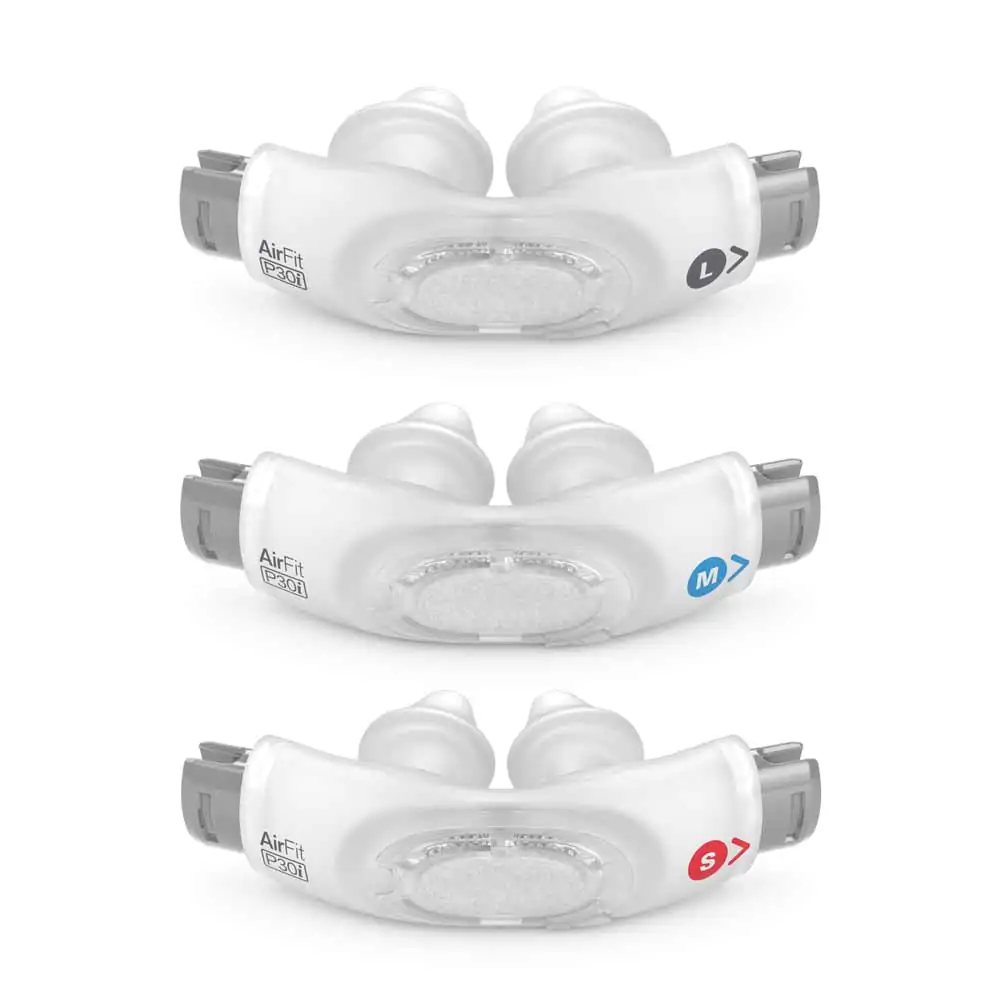
ResMed identifies the P30i indicators as red S, blue M and dark-grey L. Use the letter and model together; colours are not a universal size system across every brand or mask. ResMed’s P30i marking guidance. If you are replacing the cushion, see our P30i cushion listing.
Example 4: N30i — do not miss W or SW
The photograph shows different markings on the cushions: W, SW, M and S. Read the complete marking. SW is not the same label as S. For a frame replacement, check the frame’s own marking instead.
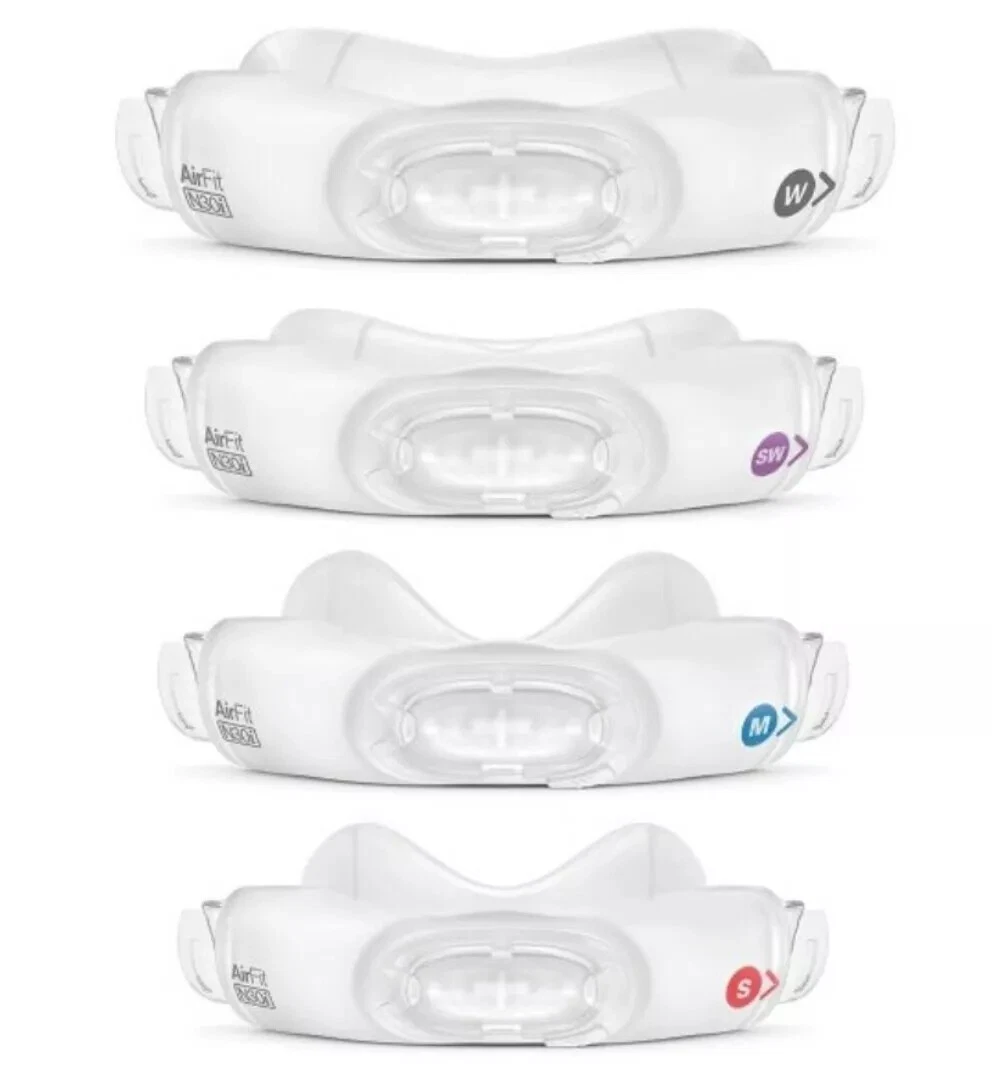
See the separate listings for the N30i cushion and N30i / P30i SpringFit frame. The size selector on each page refers to the component being sold.
Example 5: F40 — the marking can be faint
On AirFit F40, ResMed places the cushion-size marking at the bottom-right side of the cushion. The example below has a faint M. Good side lighting can make this easier to see on the real part.

AirFit F40 cushion options include Small-Wide, Medium and Large. Headgear is a separate check. ResMed’s F40 identification guidance explains the marking; our F40 cushion page shows the replacement options.
ComfortGel Full Face: read the marking on the lower flap
The reference photo shows an M on the lower front of the clear silicone flap: Medium. Look closely at the lower edge of your own ComfortGel Full mask. Read the model name too—ComfortGel Full Face and ComfortGel Nasal are different masks.

DreamWear Full Face: size letter beside the arrow
Look on the front of the cushion beside the alignment arrow. In this photograph, M means Medium cushion. The arrow helps align the cushion with the frame; it is not part of the size name.

DreamWear Nasal: check the end of the cushion
On this under-the-nose nasal cushion, the M sits next to the arrow near the frame connection. Check the letter on the cushion itself. This is the nasal cradle cushion, rather than the nasal pillows or full-face version.

Need the DreamWear frame size as well? Check the top of the frame, behind the elbow connection. Cushion size and frame size are separate. See Philips’ DreamWear marking guidance.
BMC F2, F4, N2, N4, N5 and F5: check the silicone bottom
Turn the mask gently and inspect the bottom edge of the silicone cushion for its size marking. Use a bright light and read the letter on your own cushion. For example, M means Medium. Record the model too: BMC N5 · Medium cushion.

F20 reminder: ResMed’s F20 frame accepts different cushion sizes. A Small, Medium or Large F20 selection commonly describes the cushion, so do not assume the frame or headgear has the same size. ResMed’s F20 component guidance.
What do the letters on a mask mean?
| Marking | Meaning |
|---|---|
| S / Small | Small |
| M / Medium | Medium |
| L / Large | Large |
| SW | Small-Wide |
| MW | Medium-Wide |
| W | Wide |
| STD / Standard | Standard — check which component the label describes |
These are common labels, not a list of sizes offered for every model. A long product reference or part number is also useful, but it is not a measurement in millimetres. Photograph it together with the model and size label so we can check the exact part.
If the size marking is worn away or hard to read
- Try bright, indirect light and photograph the part from a few angles. Side lighting can reveal moulded lettering in clear silicone.
- Check the original packaging, an earlier order or a prescription that names the exact mask and size. A machine invoice alone may not identify the mask.
- Check whether the label refers to a fit pack containing several cushions, rather than the single cushion currently fitted.
- If the marking remains unclear, ask our team to help identify the part. Do not guess from strap colour, age, gender or the apparent size in a photograph.
If your current mask fits comfortably and you are replacing the exact same component, its marking is a useful starting point. If the fit has been poor, or you are switching models, use the new model’s fitting guide and seek fitting support. A Medium in one model is not a universal Medium across masks.
Send three simple photos — no need to wear the mask
The whole mask
Lay it on a table so we can recognise the frame, cushion and connection layout.
The cushion marking
Take a close, sharp photo of the letters and the surrounding part. Try the underside as well.
The other label
Show the frame or headgear marking if replacing it, plus any packaging label or part number you have.
Tell us what you want to buy: a cushion, frame, headgear or complete mask. A photo showing only your CPAP machine is not enough to identify the mask size.
Let’s identify the part before you order.
Send the photos and tell us which component you need. Our support team can help check the model and visible size markings.
Ask us on WhatsAppA clearer way to describe your replacement
Example: AirFit P30i · Cushion M · Frame Small · Cushion replacement only
Before paying, compare the model, component and size against the selected product option. If buying a complete mask, check the included cushion, frame and headgear options. If you want to explore a different mask style, our Smart Mask Finder can help build a shortlist; it does not read or confirm the size of your existing mask.
Frequently asked questions
Where is the size written on a CPAP mask?
It depends on the model and component. Check the cushion or nasal pillows, then the frame and headgear separately. Use the model guide in this article to find the likely marking location.
Is my mask size the same as my CPAP or BiPAP machine model?
No. The machine name identifies the device, not the mask size. Read the mask model and the marking on the component you want to replace.
Does M on a nasal pillows cushion mean the frame is Medium too?
No. M identifies that cushion’s size. The frame may have a separate size, such as Small or Standard, depending on the model.
Are S and SW the same?
No. S means Small and SW means Small-Wide. Read the full label and select the option offered for your exact model.
Can I choose the same size when changing mask models?
Do not assume it will fit the same way. Use the new model’s fitting guide and get fitting help if needed. Matching a letter does not establish compatibility or an equivalent fit.
What if the size marking has rubbed off?
Check the packaging and previous order details, and take clear photographs of the whole mask, cushion and any remaining labels. Our support team can help investigate without guessing a size from appearance alone.
Is the size on a fit-pack box always the cushion I am wearing?
Not necessarily. A fit pack may include multiple cushions, and components may have been changed. Check the cushion currently attached and the package contents together.
Can I send photos without showing my face?
Yes. Lay the mask and components on a table. Clear photos of the model name and size markings are more useful for identification than a photograph of you wearing it.
Reference notes: Marking locations are based on the manufacturer guidance linked above. Product photographs show the pictured components and their labels; available replacement options can vary. Updated 28 November 2026.